1. The Problem
People with hearing loss often have to manage several devices on their own, and switching between different environments can be frustrating. They might struggle to hear clearly in loud spaces, miss important sounds, or feel overwhelmed adjusting settings all day. This is a real problem because it affects their confidence, independence, and ability to communicate. A connected, multi-device system makes sense because each device can help with different parts of the experience and work together to make things easier.
2. Your Role
In this project, I designed the main concept for the Sonara ecosystem, including the user journey map, basic component ideas, and how the hearing aid, smartwatch, and mobile app would work together. I made decisions based on what I thought would reduce stress for the user and create a smooth flow between devices. I used beginner UX methods like identifying user needs, sketching ideas, mapping interactions, and thinking about accessibility.
3. Process
My process started with understanding what challenges people with hearing loss experience and where technology could help. From there, I decided how each device in the system should function so they wouldn’t overlap or confuse the user. I focused on continuity by trying to make information move naturally from one device to another. I also explored where AI and automation could make things easier, like detecting sound environments or predicting when the user might need help. My main goal was to create something supportive but not overwhelming.
4. Ecosystem Journey
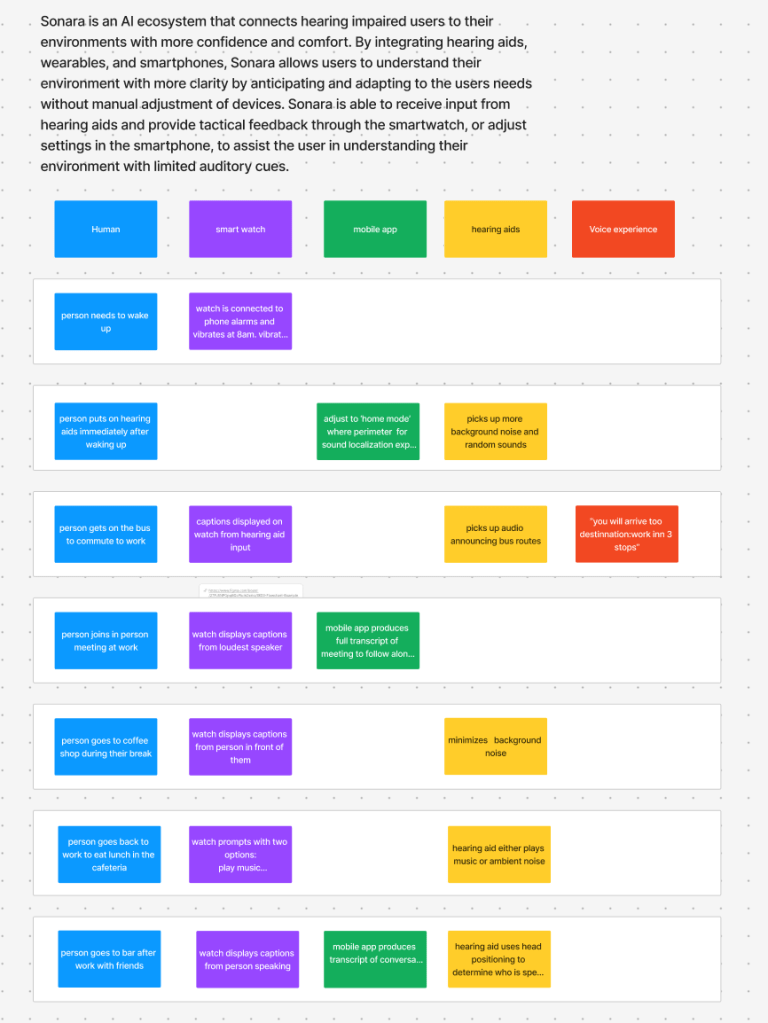
The journey starts when the user puts on their hearing aids in the morning, which automatically connect to the smartwatch and app. As the user moves through their day, different situations—like entering a loud area or starting a conversation—trigger small changes across devices. The hearing aids sense the environment, the smartwatch gives quick notifications, and the phone provides more detailed info or settings when needed. The system handles background tasks using AI, but the user can step in and adjust things whenever they want.
5. Components Overview:
| Component (5 in total) | Experience goalWhat part does this play in the overall orchestration of the connected UX experience? Why is it important? | Tech specs/requirementsIf you had to bring this product to life, what technologies would it require? For what platforms would you design? (Sensors, operating systems, hardware, software, programming languages, etc. Are these components compatible with one another?) | |
| 1 | (Replace with your own: Primary intelligent hub) | This is the brain of Sonara. It looks at all the info from hearing aids, watch, and phone, figures out what’s happening around the user, and decides how to adjust stuff automatically. Makes the system work smoothly without the user having to do much | This is like the main computer. It needs to be able to process sound data fast and make smart decisions. Works with Bluetooth and Wi-Fi to talk to the phone, watch, and hearing aids. Can use Python for AI and C++ for sound stuff. |
| 2 | Mobile/tablet app – control surface | This is where users can see what’s going on and change things if they want. Shows environmental info, device status, and suggestions. Helps people understand what Sonara is doing so they trust it. | This is the app people open on their phone or tablet. Lets users see what’s happening and change settings if needed. Made with Swift (iPhone) or Kotlin (Android). Connects to the hub via Bluetooth or the cloud. |
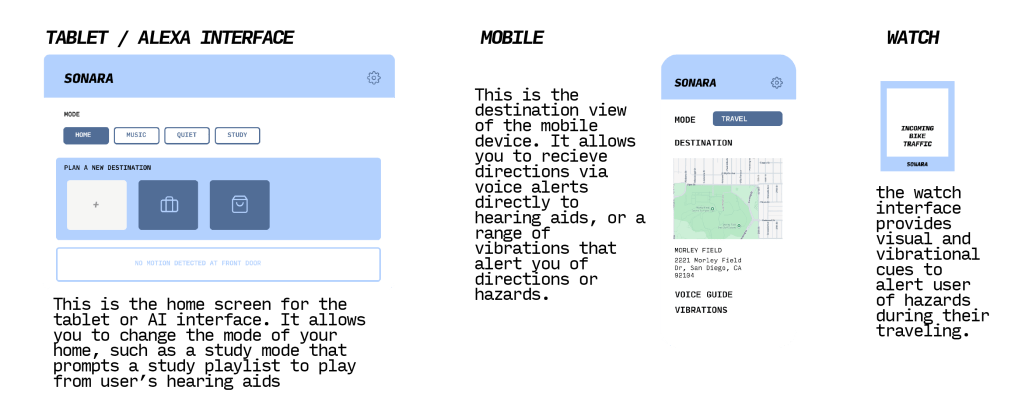
| 3 | Watch/wearable app – peripheral touchpoint | The watch gives small alerts and vibes so the user can notice important sounds quickly. Users can take quick actions without touching the phone. Makes the system feel continuous across devices. | The watch app just gives small alerts and vibes so the user can notice things quickly. Uses watchOS or Wear OS. Talks to the hub with Bluetooth. Needs haptics and maybe small AI to guess what’s important. |
| 4 | AI agent (conversational interface) | This is Sonara’s talking or chat side. It answers questions, gives tips, and warns about things in the environment. Can be quiet most of the time but speaks up when it’s important. | This is the chat or voice part of Sonara. Listens and talks to the user. Can use pre-built tools like Dialogflow or make a simple custom AI. Needs microphone, speaker, and some cloud AI for predictions. |
| 5 | Human-in-the-loop | Lets the user control what the AI does. The AI can handle normal adjustments, but the user can override or fine-tune stuff. Helps users trust the system and feel safe. | Lets the user control what the AI does. Can adjust settings on the phone or watch. Needs simple buttons or sliders. AI keeps learning from what the user chooses. Also needs safe ways to store user data. |
6. Solution
7. Demo Video
8. Reflection
What I learned about designing across devices:
I learned that designing for multiple devices means you have to think about how everything connects instead of designing one screen at a time. Each device has its own purpose, and the challenge is making them feel like one experience.
How AI could be used better to solve user problems:
AI could become more personalized by learning the user’s habits over time and adjusting settings automatically. It could also help predict difficult listening situations before they happen.
Ethical implications of my system:
Because the system uses a lot of personal and environmental data, privacy is really important. The user should always understand what data is being used and have control over it.
Where the system could be more intelligent or human-centered:
The ecosystem could be more human-centered by offering simple explanations for why the AI makes certain changes. It could also focus more on reducing stress or listening fatigue throughout the day.
Key tradeoffs or constraints I encountered:
I had to balance giving the user control with letting the system automate things. Too much automation might feel uncomfortable, but too little would make the system less helpful. I also realized how easy it is for a multi-device system to become complicated if things aren’t clearly designed.
 AC
AC 
Leave a comment